Mehmet Ergene
A Look into the Borrowing Windows Hello Keys Attack
Recently, Dirk-jan Mollema shared a method to abuse WHfB keys to register a rogue device, request a PRT for that device, and add other backdoor authentication material such as WHfB.
Even though I have detections that work regardless of the MFA method or device being used, I wanted to see how the attack works and what it leaves behind in the logs for detection. Spoiler alert: the queries in Dirk-jan’s blog did not catch the attack I performed, and I informed him with the details.
Even though I have detections that work regardless of the MFA method or device being used, I wanted to see how the attack works and what it leaves behind in the logs for detection. Spoiler alert: the queries in Dirk-jan’s blog did not catch the attack I performed, and I informed him with the details.
Legitimate WHfB Registration
To distinguish malicious activity from benign activity, I first wanted to see what a normal WHfB registration looks like and how it is used when signing in to applications.
I created a WHfB device policy in Intune targeting only one test device. I also created a test Conditional Access policy that enforces WHfB when accessing Admin portals. In addition, I already have a “Require multifactor authentication for registering or joining device” policy in my test tenant. I do this because sometimes small differences can have a big impact on the results.
Most of the time, registering WHfB results in two events:
I created a WHfB device policy in Intune targeting only one test device. I also created a test Conditional Access policy that enforces WHfB when accessing Admin portals. In addition, I already have a “Require multifactor authentication for registering or joining device” policy in my test tenant. I do this because sometimes small differences can have a big impact on the results.
Most of the time, registering WHfB results in two events:
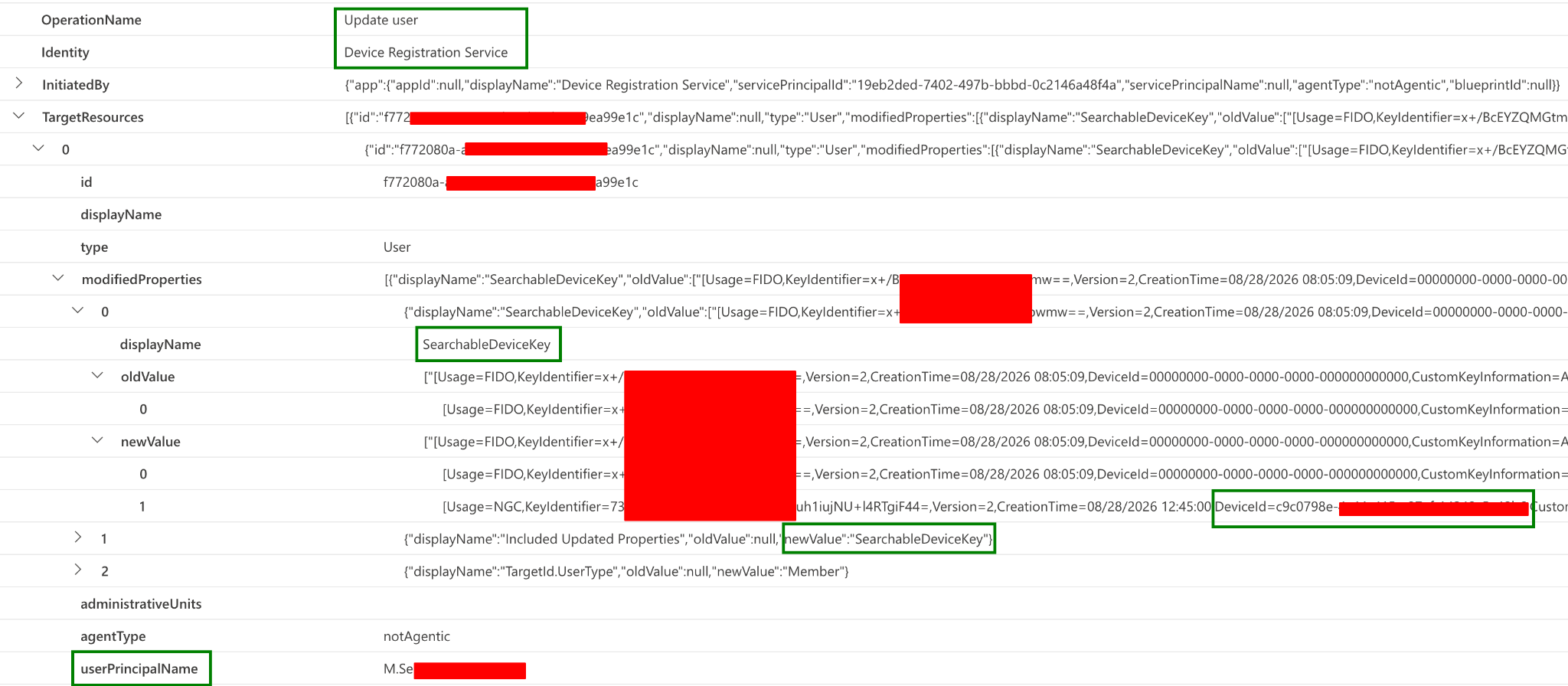
Update user
The actor for this event is Device Registration Service. While this is a generic event, you can identify WHfB registration by looking at the modifiedProperties section. SearchableDeviceKey and Usage=NGC indicate WHfB registration.
Unfortunately, this event does not contain the IP address of the user/device. However, it does contain the device ID and user information.
Unfortunately, this event does not contain the IP address of the user/device. However, it does contain the device ID and user information.
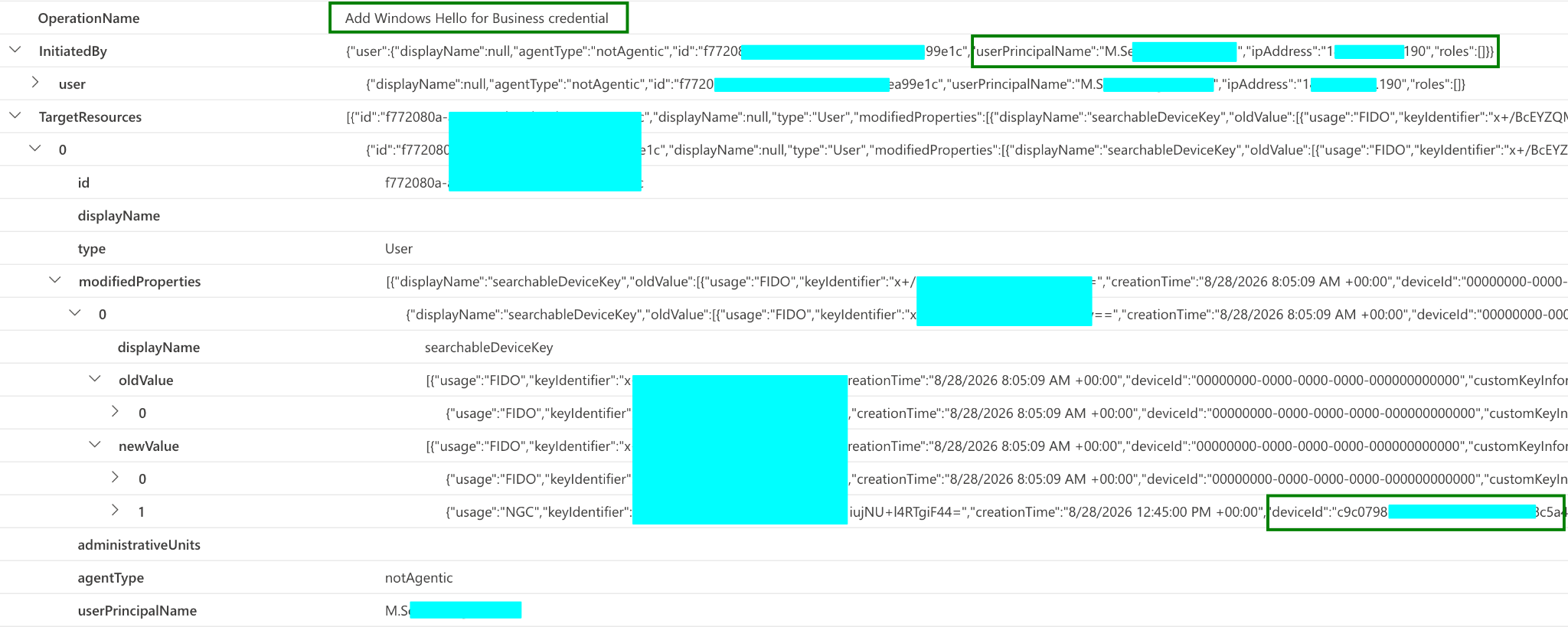
Add Windows Hello for Business credential
This event is quite similar to the Update user event, but it has a more descriptive operation name and contains the IP address from which the registration was initiated.
Inconsistent Log Generation
Interestingly, the generation of these events is inconsistent. I’ve seen occurrences where only one of the events, either Update user or Add Windows Hello for Business credential, was generated in the logs.
In fact, one of the red team activities involving WHfB registration to a rogue device resulted in only the Update user event appearing in the logs.
I have no idea why this happens and couldn’t find any information explaining it, but it’s quite concerning for a product that is at the core of everything in an enterprise. If you’re relying on the Add Windows Hello for Business credential event alone, you may have a critical detection gap.
In fact, one of the red team activities involving WHfB registration to a rogue device resulted in only the Update user event appearing in the logs.
I have no idea why this happens and couldn’t find any information explaining it, but it’s quite concerning for a product that is at the core of everything in an enterprise. If you’re relying on the Add Windows Hello for Business credential event alone, you may have a critical detection gap.
Malicious WHfB Registration
I used roadtx to register first a device, and then the WHfB for it using a FIDO assertion stolen from the victim device.
Based on my tests, there is no difference in the events except for the IP address from which the malicious WHfB registration originates.
Based on my tests, there is no difference in the events except for the IP address from which the malicious WHfB registration originates.
Detection Opportunities
WHfB registration from an unusual IP address or geolocation may indicate malicious activity if you have reliable Add Windows Hello for Business credential events. As mentioned above, however, this event seems to be recorded inconsistently.
In addition, I analyzed the sign-in logs and used the queries Dirk-jan shared in his blog. To my surprise, none of the queries detected my activity. I informed him as well, and neither of us knows the reason.
When performing the sign-in, I used the command below to open Outlook with the rogue WHfB:
In addition, I analyzed the sign-in logs and used the queries Dirk-jan shared in his blog. To my surprise, none of the queries detected my activity. I informed him as well, and neither of us knows the reason.
When performing the sign-in, I used the command below to open Outlook with the rogue WHfB:
This resulted in an interactive sign-in event with ResultType 50140 instead of 0.
There was also more than one entry in the AuthenticationDetails column, and AuthenticationContextClassReferences was not empty:
There was also more than one entry in the AuthenticationDetails column, and AuthenticationContextClassReferences was not empty:
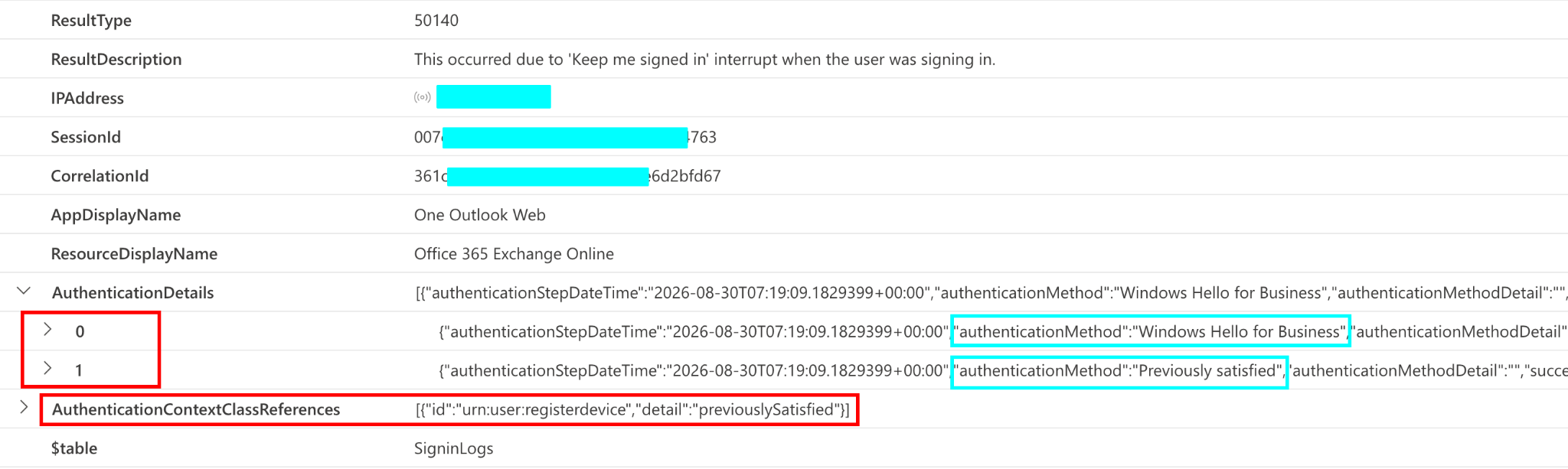
There were other sign-in events involving WHfB, but none of them matched the queries.
One way to improve the detection would be to include 50140 in the original query and then start excluding false positives based on application and resource information. IP, ASN, and geolocation details can also be used.
One way to improve the detection would be to include 50140 in the original query and then start excluding false positives based on application and resource information. IP, ASN, and geolocation details can also be used.
SigninLogs
| where ResultType in (0, 50140)
| where AuthenticationDetails has "Windows Hello"
| where isempty(DeviceDetail.deviceId)
| where AppId !in ("whitelisted_apps")
An adversary is likely to register a rogue device with the stolen FIDO assertion. So, a more focused detection would be:
SigninLogs
| where ResultType == 0
| where AuthenticationDetails has "Windows Hello"
| where isempty(DeviceDetail.deviceId)
| where ResourceIdentity == "01cb2876-7ebd-4aa4-9cc9-d28bd4d359a9"  // "Device Registration Service"
Still, it doesn't guarantee that there is something malicious going on. One benign scenario could be a device with WHfB being registered/enrolled.
The Danger Ahead
Registering a rogue WHfB requires simple code execution with PowerShell on the device. This means it could easily be turned into a fully automated ClickFix-style attack.
So, you should start monitoring for rogue WHfB registrations and suspicious sign-in activities involving WHfB.
So, you should start monitoring for rogue WHfB registrations and suspicious sign-in activities involving WHfB.
Conclusion
While mitigating the AiTM attacks, WHfB can be targeted easily where the visibility and the log quality is horrible.
A legitimate and malicious WHfB registration can look almost identical in the audit logs, with the originating IP address being the main difference, if the relevant event, Add Windows Hello for Business credential, is recorded.
The sign-in side has similar problems. The queries I tested did not detect the rogue WHfB activity I performed, and my sign-in generated result type 50140 rather than 0.
For detection, this means relying on a single audit event or a narrowly defined sign-in pattern may cause you to miss the activity. Monitoring WHfB registration, accounting for the inconsistent event generation, and examining the available IP, ASN, geolocation, application, and resource information may provide a better chance of finding rogue registrations or activities.
I hope Entra ID audit logging receives the attention it deserves and Microsoft does something to improve it.
A legitimate and malicious WHfB registration can look almost identical in the audit logs, with the originating IP address being the main difference, if the relevant event, Add Windows Hello for Business credential, is recorded.
The sign-in side has similar problems. The queries I tested did not detect the rogue WHfB activity I performed, and my sign-in generated result type 50140 rather than 0.
For detection, this means relying on a single audit event or a narrowly defined sign-in pattern may cause you to miss the activity. Monitoring WHfB registration, accounting for the inconsistent event generation, and examining the available IP, ASN, geolocation, application, and resource information may provide a better chance of finding rogue registrations or activities.
I hope Entra ID audit logging receives the attention it deserves and Microsoft does something to improve it.
References
Share

Copyright © 2026
Featured Links
Subscribe to our Newsletter!
Thank you!
New Challenge Lab
We're excited to launch our first hands-on lab challenge: Threat Hunting and Incident Response Case #001!
This lab simulates a real-world breach with two investigation paths:
This lab simulates a real-world breach with two investigation paths:
1️⃣ Incident Response: Triage an initial alert and unfold the attack.
2️⃣ Threat Hunting: Start with a TTP and hunt for adversary activity.
Select your country
Please choose your country to see the correct page.