Device Roles in Microsoft Defender XDR: Better Context for Threat Hunting and Detection Engineering
Microsoft has added a DeviceRoles column to the DeviceInfo table in Microsoft Defender XDR Advanced Hunting. I've been asking for this type of device context for a long time, so I was happy to see it finally appear.
For threat hunting and detection engineering, it solves a problem I regularly run into: understanding what a device actually does without leaving the hunting query. For example, I hate switching to CMDB and finding out the device is just a Terminal server.
DeviceRoles JSON-formatted string field, containing roles identified by the system or defined by users, confidence levels, and the last time each role was observed.
That gives us another useful source of context directly inside DeviceInfo.
Looking at the DeviceRoles Column
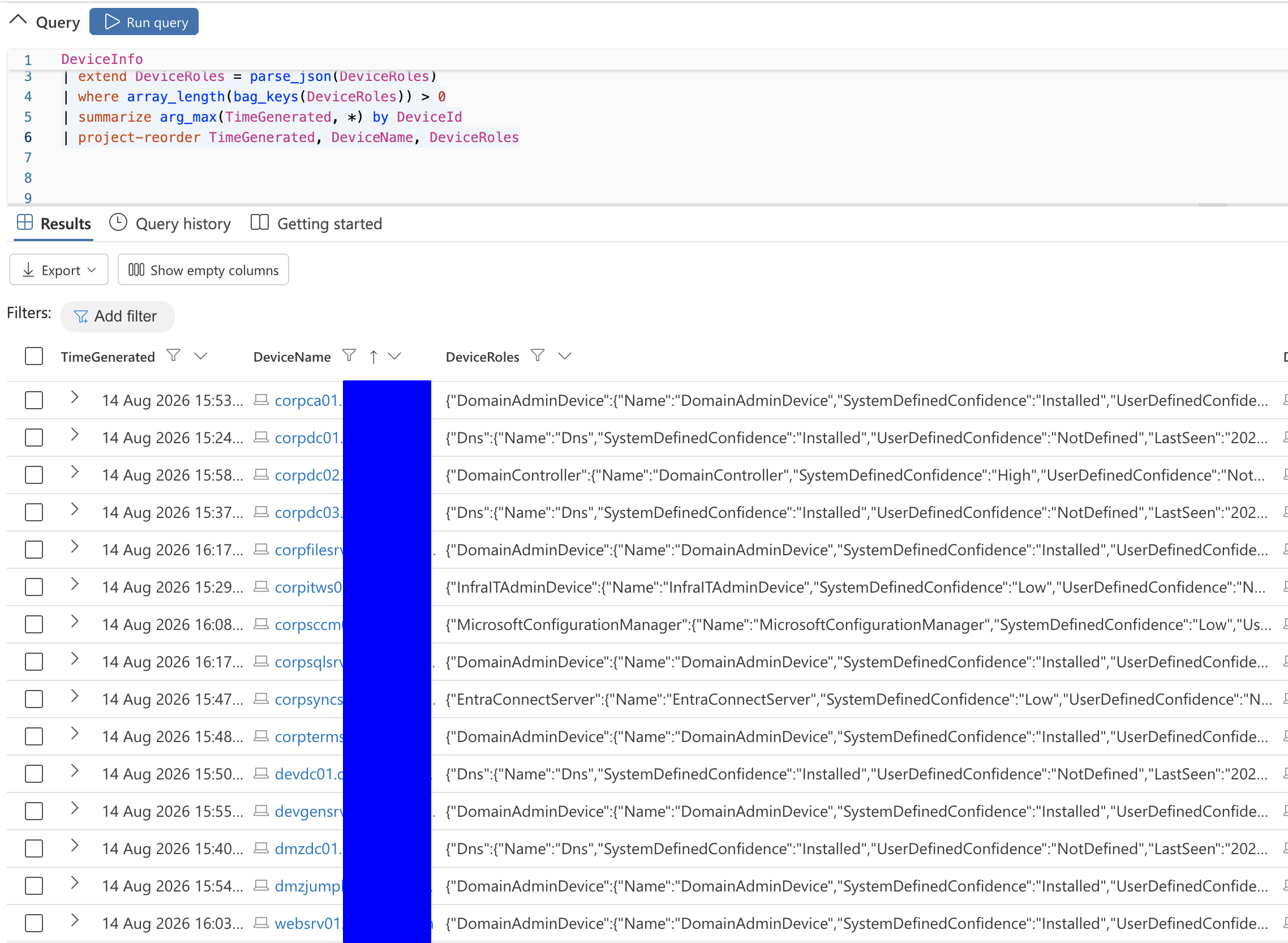
The easiest way to see what Defender has identified in your environment is to look at the latestDeviceInfo record for each device:
DeviceInfo
| where TimeGenerated > ago(7d)
| extend DeviceRoles = parse_json(DeviceRoles)
| where array_length(bag_keys(DeviceRoles)) > 0
| summarize arg_max(TimeGenerated, *) by DeviceId
The DeviceRoles field contains more than a simple label. Depending on the role, we can see information about how the role was identified, its confidence, and when it was last seen. For example, some entries contain a SystemDefinedConfidence value of "Installed". Other roles have confidence values such as Low, Medium, or High.
That indicates there is no single mechanism to identify the roles.
How Does Defender Identify a Device Role?
Microsoft's current DeviceInfo documentation explains the contents of DeviceRoles, but it doesn't document the detection logic behind each system-defined role. So the following is based on what I've observed in my own environment rather than documented Microsoft behavior. For some roles, Defender appears to identify the role based on installed software, Windows Server roles, or similar configuration information. This is recorded as "SystemDefinedConfidence: Installed". The other identification method(s) are more interesting. Defender assign roles with confidence levels such as Low, Medium, High. This suggests that Defender is deriving some classifications from observed behavior rather than simply checking whether a particular component is installed. One example from my lab is my Microsoft Entra Connect server visible in the screenshot above. Defender correctly identified its role, although it assigned a Low confidence level. While the classification itself was correct, the confidence level surprised me because I would've expected an Entra Connect server to provide enough signals for a higher-confidence classification. Without documentation about the underlying logic, however, it's difficult to say exactly which signals contributed to that result.
Interesting *AdminDevice Roles
The role category that stood out to me was the set of roles ending in AdminDevice.
I've observed classifications such as:
DomainAdminDevice
NetworkAdminDevice
InfraITAdminDevice
These appear to describe something different from a traditional server role. A domain controller has a technical function. An AdminDevice, on the other hand, seems to describe the security context in which a device is being used. Based on what I've observed, Defender appears to analyze logon activity and administrative user context when assigning these classifications. For example, when a Domain Admin logs on to a server, Defender may identify that system as a DomainAdminDevice. Similar behavior appears to exist for other administrative categories. I don't have visibility into the exact classification logic, so I wouldn't build assumptions around specific group membership or logon thresholds yet. But from a threat hunting perspective, the resulting information is already useful. A workstation regularly used by highly privileged administrators deserves different scrutiny than a normal employee workstation. Now that distinction can potentially become part of the query itself.
Device Context in Threat Hunting and Detection Engineering
During hunting for a threat or developing a detection query, we often end up with a set of results that need to be examined and whitelisted.
As an example, if you know your jump servers have strict security controls, you can easily exclude them in your query using the device role context.
In addition to whitelisting, device roles also eliminates the need for maintaining lists in detection queries. For example, I recently shared a detection related to the CertiGhost vulnerability as below:
let domain_controllers = pack_array("list of domain controllers");
let domain_controller_ips = pack_array("IP addresses of domain controllers");
DeviceLogonEvents
| where AccountName has_any (domain_controllers)
| where isnotempty(RemoteIP)
| where RemoteIP !in ("::1", "127.0.0.1", "-")
| where RemoteIP !startswith "fe80::"
| where RemoteIP !in (domain_controller_ips)
This query requires you to maintain the list of domain controllers and their IP addresses. With the device role information already available in advanced hunting, the query can be written so that it automatically builds the lists during the query runtime:
let domain_controllers =
    DeviceInfo
    | where DeviceRoles has "DomainController"
    | summarize make_set(DeviceId)
;
let domain_controllers_hostnames =
    DeviceInfo
    | where DeviceId in~ (domain_controllers)
    | extend hostname = tostring(split(DeviceName, ".")[0])
    | summarize make_set(hostname)
;
let domain_controller_ips =
    DeviceNetworkInfo
    | where DeviceId in (domain_controllers)
    | where IPAddresses != '[]'
    | extend IPAddresses = parse_json(IPAddresses)
    | mv-expand IPAddresses
    | where IPAddresses.AddressType == "Private"
    | where IPAddresses.IPAddress !startswith "fe80::"
    | where IPAddresses.IPAddress !startswith "169.254"
    | extend IPAddress = tostring(IPAddresses.IPAddress)
    | summarize make_set(IPAddress)
;
DeviceLogonEvents
| where AccountName has_any (domain_controllers_hostnames)
| where isnotempty(RemoteIP)
| where RemoteIP !in ("::1", "127.0.0.1", "-")
| where RemoteIP !startswith "fe80::"
| where RemoteIP !in (domain_controller_ips)
Conclusion
The new DeviceRoles field adds useful device context directly to Advanced Hunting. It can reduce our dependency on static device lists, make detections easier to maintain, and help us judge suspicious activity based on the role of the affected system. It would be great to have more documentation around how roles and confidence levels are assigned, but even in its current form, DeviceRoles is a useful addition for both threat hunting and detection engineering.